
188PKR registration process is designed to help new users create an account and access the platform from Android or supported web access. Registration usually takes only a few minutes when the correct details are entered. Before creating an account, users should make sure they are using the correct 188PKR platform and should never share passwords, OTP codes, or payment information with unknown people.
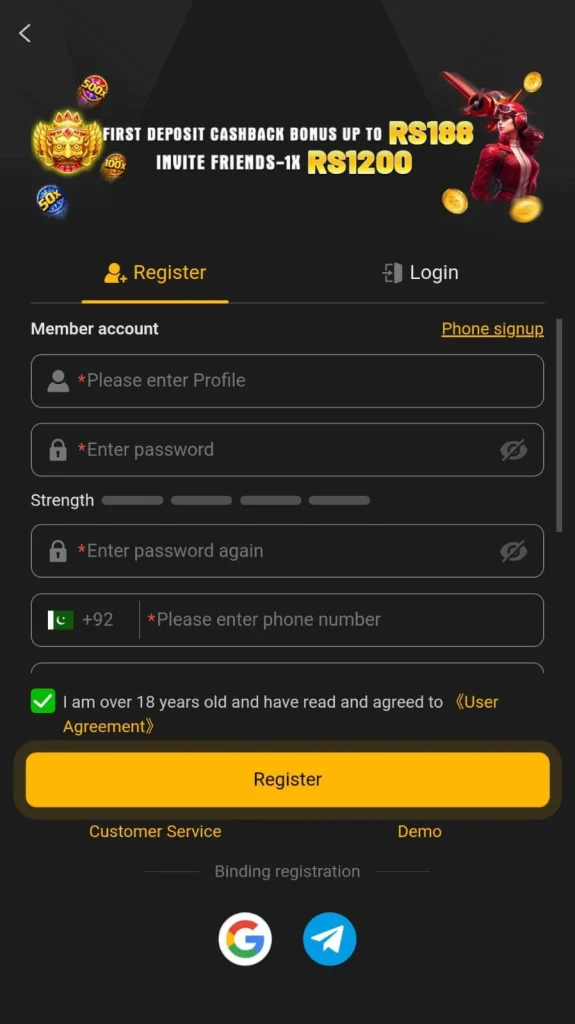
How to Register on 188PKR Game?
Follow these steps to create a new 188PKR account:
- Open the 188PKR Game app or current website.
- Tap the Register or Sign Up button.
- Enter your active mobile number.
- Create a strong password.
- Confirm the password if required.
- Add a referral code if you have one.
- Enter the OTP if verification is requested.
- Accept the applicable terms and conditions.
- Tap Register to create your account.
After successful registration, users can log in and access the available games, promotions, account settings, and wallet features.
What Information Is Required for 188PKR Registration?
The exact registration form may change with updates, but users may need:
- Active mobile number
- Strong password
- OTP verification
- Referral code, if optional
- Basic account details
Always enter correct information because inaccurate details may cause login or account recovery problems later.
How to Verify Your 188PKR Account?
Some users may receive an OTP during registration.
If verification is required:
- Enter your correct mobile number.
- Wait for the verification code.
- Enter the OTP in the required field.
- Submit the code to complete verification.
Never share an OTP with anyone, including someone claiming to be customer support.
How to Use a Referral Code During Registration?
188PKR may provide a referral feature for new users. If you have a valid referral code, enter it in the Referral Code field during account creation. Some referral promotions may offer benefits when specific requirements are completed. A referral code may be optional, so users should not enter random codes from unknown sources.
188PKR Registration Not Working? Try These Fixes
Mobile Number Already Registered
If the number already has an account, try logging in instead of creating another account.
OTP Not Received
Check your mobile signal, confirm the number, and wait before requesting another verification code.
Password Not Accepted
Create a stronger password using letters, numbers, and other supported characters.
Registration Page Not Loading
Switch to a stable internet connection, refresh the page, or restart the app.
App Showing an Error
Check whether you are using the latest compatible version of the 188PKR app.
Tips for Creating a Secure 188PKR Account
Use these basic safety practices:
- Create a unique password.
- Never reuse your banking or email password.
- Keep your OTP private.
- Avoid registering through unknown links.
- Do not share account credentials.
- Check the website or app before entering personal details.
- Keep your registered mobile number active.
These steps can help reduce common account security problems.
Can I Create More Than One 188PKR Account?
Users should check the current platform rules before creating multiple accounts. Some platforms limit users to one account per mobile number or device. Creating duplicate accounts may also affect promotions, verification, or account access. Using one properly verified account is usually the simpler option.
What to Do After 188PKR Registration?
After creating your account, you can:
- Log in to your dashboard
- Explore available game categories
- Review account settings
- Check current promotions
- Review wallet options
- Read bonus conditions
- Set up account security
New users should understand the platform and its rules before using any payment-related feature.
Final Words
The 188PKR registration process is straightforward when users provide correct account information and complete any required verification. Always use a strong password, protect your OTP, and check the current platform details before creating or using an account.
FAQs About 188PKR Registration
Open the platform, tap Register, enter your mobile number, create a password, and complete verification if required.
A mobile number is commonly required for account creation and OTP verification on the platform.
Network issues, an incorrect number, or delayed SMS delivery may prevent the OTP from arriving immediately.
A referral code may be optional depending on the current registration system and available promotions.
Your mobile number may already be linked to an account, so try logging in or recovering your password.
Account registration may be free, but users should check current platform terms before using paid gaming features.